As an Amazon Associate, Tarkov Season earns from qualifying purchases. Picks are ours; a purchase through a link costs you nothing extra.
The best monitor for Tarkov has to do two jobs that pull against each other. It has to show a player tucked into a dark corner on Interchange or in a bush at the edge of Woods, and it has to stay clear when you snap your view across a doorway. That is why every pick on this page is an OLED panel: near-instant pixel response for motion, and black levels that keep detail in shadow instead of turning it into grey haze.
These are high-end screens. If you are building or upgrading for Season 2, start with the processor and graphics card in our full Tarkov gear guide, then pick the monitor your PC can actually feed.
Best monitor for Tarkov: quick picks
| Pick | Product | Best for |
|---|---|---|
| Best overall | LG UltraGear 27GX790A-B | most high-end Tarkov rigs at 1440p |
| Fastest 1440p | ASUS ROG Swift PG27AQWP-W | players with a top-end X3D CPU who want every bit of motion clarity |
| Best 4K at 27 inches | ASUS ROG Swift PG27UCDM | spotting detail at range on a compact desk |
| Best 32 inch | ASUS ROG Swift PG32UCDP | a bigger screen that can switch between sharp and fast |
| Best for a 360Hz setup | Alienware AW2725DF | a high-end 1440p setup that does not chase the very top refresh rates |
How we picked
We picked from current OLED gaming monitors on Amazon and kept only models that are in stock as we publish. Every spec below comes from the manufacturer’s listing. We have not run these monitors through our own tests, so treat this as a spec-based shortlist with our reasoning for Tarkov, not a lab review.
We weighed four things for this game: response time and refresh rate for fast turns, contrast for dark interiors and night raids, pixel density for spotting at range and through optics, and burn-in protection, because Tarkov keeps a static interface on screen for hours of inventory management and hideout time.
Best overall: LG UltraGear 27GX790A-B
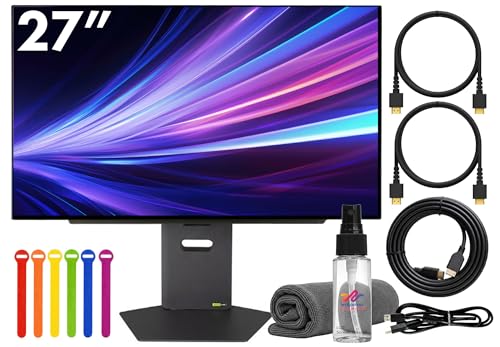
A 27 inch QHD OLED at 480Hz with a 0.03ms response time, G-SYNC Compatible and FreeSync Premium Pro. The bundle adds an HDMI cable and a cleaning kit.
For Tarkov at 1440p this is the balanced choice. The listing gives a 27 inch 2560 x 1440 OLED panel at 480Hz with a 0.03ms response time, so motion stays clean when you check corners or track a target crossing a gap. LG rates it VESA DisplayHDR True Black 400 with up to 1300 nits peak brightness, which matters in a game that cuts between bright snow and pitch-dark stairwells.
We like it as the default because 480Hz is already more refresh than a lot of Tarkov setups will fill, and stepping up to a faster panel only pays off if your CPU keeps up. The stand gives height, tilt, swivel and pivot, and adaptive sync on both NVIDIA and AMD cards smooths out the frame rate dips that big maps are known for.
Best for: most high-end Tarkov rigs at 1440p. Skip it if: you want the sharpest possible image for long-range spotting.
Fastest 1440p: ASUS ROG Swift PG27AQWP-W

A 26.5 inch Tandem OLED that runs QHD at 540Hz or drops to 720Hz at lower resolution, with a 0.02ms response time and a glossy TrueBlack panel.
This is the fastest 1440p screen on the list. ASUS lists a 26.5 inch QHD Tandem OLED running at 540Hz, with a dual mode that switches to 720Hz at HD resolution and a 0.02ms response time. The Tandem panel is rated for 15% higher peak brightness and 60% longer lifespan than ASUS’s previous WOLED generation, and the TrueBlack Glossy coating avoids the haze some matte screens add.
The catch for Tarkov is the rest of your PC. A refresh rate this high only helps when the game delivers frames to match, and Tarkov leans hard on the processor. Pair it with a high-end X3D chip and a fast graphics card. OLED Care Pro with a proximity sensor blanks the screen when you walk away, a useful guard while you sit in the stash or the hideout.
Best for: players with a top-end X3D CPU who want every bit of motion clarity. Skip it if: your PC cannot push high frame rates on the big maps.
Best 4K at 27 inches: ASUS ROG Swift PG27UCDM
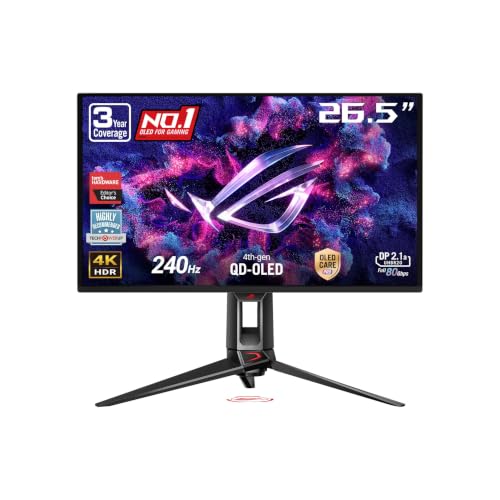
A 26.5 inch 4K QD-OLED at 240Hz with a 0.03ms response time, DisplayPort 2.1a and OLED Care Pro burn-in protection, backed by a three year warranty that covers burn-in.
If you would rather see a helmet outline at the far end of a sightline than gain extra refresh, this is the pick. It packs 3840 x 2160 into a 26.5 inch QD-OLED panel at 240Hz and a 0.03ms response time, which makes for very high pixel density at a normal desk distance. Fine detail in foliage and through low-power scopes is where that pays off.
4K is heavy to drive, so plan on a top graphics card and lean on upscaling. Patch 1.3.5.0 improved the stability and image quality of NVIDIA DLSS and the performance of AMD FSR 2 and FSR 3, which makes a 4K panel more practical in Tarkov than it used to be. ASUS covers burn-in under the three year warranty and adds a proximity sensor for OLED Care Pro.
Best for: spotting detail at range on a compact desk. Skip it if: you care more about raw refresh rate than sharpness.
Best 32 inch: ASUS ROG Swift PG32UCDP

A 32 inch 4K WOLED with a dual mode that runs 4K at 240Hz or FHD at 480Hz, a 0.03ms response time and USB-C with 90W charging.
A 32 inch screen gives Tarkov more presence, and this ASUS adds a trick that suits the game. Its dual mode runs the panel at 4K and 240Hz for normal play, or at FHD and 480Hz when you want maximum motion clarity, so one monitor covers both a slow, careful Shoreline raid and a fast Factory run. The listing gives a 0.03ms response time and true 10-bit color.
The bigger screen means more head and eye movement, which some players love and others find tiring in a long session. ROG’s OLED anti-flicker feature is aimed at the refresh rate swings that happen in heavy scenes, and the three year warranty includes burn-in coverage. Skip the AI Crosshair and AI Sniper features listed for this model; keep your setup simple and fair.
Best for: a bigger screen that can switch between sharp and fast. Skip it if: you sit close to the screen and like to see the whole view without moving your eyes.
Best for a 360Hz setup: Alienware AW2725DF

A 27 inch QHD QD-OLED at 360Hz with a 0.03ms response time, 99.3% DCI-P3 color and FreeSync Premium Pro, with a three year warranty.
Not every Tarkov rig needs the fastest panels on this list, and this Alienware is the honest pick for those setups. It is a 27 inch 2560 x 1440 QD-OLED at 360Hz with a 0.03ms response time, rated VESA DisplayHDR True Black 400 and 99.3% DCI-P3. You get the same deep blacks and clean motion that make OLED good for this game, at a refresh rate that more systems can actually use on the busy maps.
Quantum dot OLED avoids the glow and halo around bright objects that some panels show in dark scenes, which helps when a flashlight or muzzle flash appears in a black room. ComfortView Plus cuts blue light in hardware without shifting colors much, and the connections include two DisplayPort inputs, HDMI and USB-C.
Best for: a high-end 1440p setup that does not chase the very top refresh rates. Skip it if: you already own a top-end X3D CPU and want the fastest panel available.
What matters in a Tarkov monitor
Response time and contrast matter more in Tarkov than in most shooters. Fights often start with a few pixels of movement in shadow, and a slow LCD can smear that movement or crush it into black. Every OLED on this list is rated at 0.03ms or 0.02ms response, and each pairs that with per-pixel black levels.
Refresh rate is the next lever, but it depends on your PC. Tarkov is known for leaning on the processor, especially on large maps, so a 540Hz panel on a mid-range CPU wastes most of its range. Match the screen to the frame rates you actually see in raid. If you are not sure, the 360Hz and 480Hz picks are the safer buys.
Resolution is a trade. 1440p at 27 inches is the sweet spot for a high-end build: sharp enough to spot at range and light enough to run fast. 4K gives cleaner detail in foliage and through optics, and Patch 1.3.5.0 improved image quality in optics while reducing FPS drops when aiming down sights.
OLED burn-in and Tarkov
Tarkov keeps a lot of static interface on screen: the stash grid, the trader screens, the hideout. OLED panels can retain static images over time, so pick a model with active protection. The PG27AQWP-W and PG27UCDM list OLED Care Pro with a proximity sensor that blanks the screen when you step away. The PG27UCDM and PG32UCDP listings give a three year warranty that covers burn-in, and the Alienware AW2725DF lists a three year warranty.
Simple habits help too: let the monitor run its pixel refresh cycles, hide the taskbar, and do not leave the game paused on the stash screen while you step away.
What PC you need to feed these screens
Steam lists the recommended specs for Tarkov as an Intel Core i7-14700F or better, 64 GB of RAM and an RTX 4070 or better. That is a floor for good play, not for these monitors. To get real value from a 480Hz or 540Hz panel, plan on a high-end X3D processor and a top-tier current graphics card, which are covered in our CPU and graphics card picks.
More Tarkov gear and builds
- The full high-end Tarkov gear guide: CPU, GPU, audio, mouse, keyboard and chair picks
- Season 2 modifier calculator: plan a legal build before you create your character
- Best solo build for Tarkov Season 2 and best team build
- Cold-Blooded modifier guide: the Season 2 positive that makes you harder to see through thermal optics
FAQ
What is the best monitor for Tarkov?
For most high-end setups, a 27 inch 1440p OLED at 360Hz to 480Hz, such as the LG UltraGear 27GX790A-B. It balances clarity in dark areas, motion clarity and a refresh rate that a strong PC can actually use in Tarkov.
Is OLED good for Tarkov?
Yes. OLED gives per-pixel black levels and near-instant response, which helps in dark interiors and fast turns. Pick a model with burn-in protection, because Tarkov keeps static menus on screen for long stretches.
1440p or 4K for Tarkov?
1440p is the better fit for a high-refresh setup because it is easier to run at high refresh rates. 4K gives sharper detail at range and through optics, but you need a top graphics card and upscaling such as DLSS or FSR to keep it smooth.
Do I need a 540Hz monitor for Tarkov?
Only if your PC can deliver frame rates that high, which usually means a top-end X3D processor. Tarkov leans hard on the CPU, so many setups get more from a 360Hz or 480Hz panel.
Sources
Product details from the Amazon listings as of 27 November 2026. Listings, stock and specs change; check the listing before you buy. Unofficial fan site.



Pingback: Best High-End PC Gear for Tarkov: CPU, GPU, Monitor, Audio