As an Amazon Associate, Tarkov Season earns from qualifying purchases. Picks are ours; a purchase through a link costs you nothing extra.
The best headset for Tarkov is the one that lets you hear a fight before you see it. Footsteps on the floor above, a door opening down the hall, a reload behind cover: in this game sound is information, and a muddy or fatiguing headset costs you the first shot. Your squad needs to hear you just as clearly, so the microphone matters nearly as much as the drivers.
There are two routes, and this page covers both. Gaming headsets bundle a mic and, in most cases, wireless convenience. Open-back headphones give a wider sense of space but need a separate mic and often a desktop amp. If you are building or upgrading for Season 2, start with the processor and graphics card in our full Tarkov gear guide, then choose the audio setup that fits how you play.
Best headset for Tarkov: quick picks
| Pick | Product | Best for |
|---|---|---|
| Best wireless overall | SteelSeries Arctis Nova Elite | a no-compromise wireless headset for long sessions |
| Best for squad comms | Logitech G PRO X3 LIGHTSPEED | squad leaders who talk a lot and want a clear boom mic |
| Best multi-device headset | SteelSeries Arctis Nova Pro Omni | players who also use a console or phone and want one headset for all of it |
| Best for switching systems | Logitech G Astro A50 | a PC player who also games on a console |
| Best open-back with a mic | ASUS ROG Kithara HIFIMAN | the open-back route without sourcing a separate microphone |
| Best for open soundstage | Sennheiser HD 490 PRO | listening for position with a wide open sound and your own mic |
| Best for deep, controlled bass | Sennheiser HD 660S2 | open-back listeners who also use the same headphones for music |
| Best amp for headphones | FiiO K7 Desktop DAC and Amplifier | driving open-back headphones from the PC with a proper amp |
How we picked
We picked from current headsets, open-back headphones and desktop amplifiers on Amazon and kept only models that are in stock as we publish. Every spec below comes from the manufacturer’s listing. We have not run these products through our own tests, so treat this as a spec-based shortlist with our reasoning for Tarkov, not a lab review.
We weighed four things for this game: how well the design suits placing sounds around you, microphone quality for squad comms, comfort over long raids and stash sessions, and how much extra hardware the setup needs. Many headsets and some amps offer virtual surround or EQ features. We make no claim that they help or hurt in Tarkov; try your own setup with those features on and off and keep whichever lets you place sounds more easily.
Best wireless overall: SteelSeries Arctis Nova Elite

A Hi-Res wireless headset with carbon fiber drivers, active noise cancellation, an AI noise-rejecting mic and a swappable battery system that keeps a spare charging in the base.
This is the flagship wireless pick. SteelSeries lists 96kHz/24bit audio over 2.4GHz or Bluetooth, carbon fiber drivers aimed at low distortion and clarity, and active noise cancellation that shuts out the room. For Tarkov that matters in two ways: a quiet background lets you pick out quiet cues, and the AI noise rejection on the mic keeps your squad hearing you, not your keyboard.
The Infinite Power System is the feature that suits long raids. Two batteries swap in and out, so one powers the headset while the other charges in the GameHub, and you are not stopped by a dead headset mid-session. The Arctis Companion app gives real-time access to game, Bluetooth and mic EQ. A closed, noise-cancelling design will not give the open airy feel of the headphone picks below, so skip it if that sense of space is what you want.
Best for: a no-compromise wireless headset for long sessions. Skip it if: you want open-back sound or you play wired and do not need a battery system.
Best for squad comms: Logitech G PRO X3 LIGHTSPEED

A wireless headset with graphene drivers, a full-bandwidth microphone, a ten-band EQ and a battery rated for very long play between charges.
Logitech built this around communication and endurance. The listing gives a 48 kHz full bandwidth microphone, 50mm PRO-G graphene drivers and up to 70 hours of battery life under continuous play, so charging is rarely a thought. If you are the one calling out positions on Customs or Woods, a clear boom mic is the feature that earns its keep.
Comfort is addressed directly: memory foam leatherette ear cups and a perforated headband for long sessions. The 10 band EQ and G HUB presets let you shape the sound to your taste, and the listing also advertises surround and Bluetooth. Treat any surround feature as something to test, not assume, by playing a few raids with it on and off. There is no active noise cancellation listed, so it fits a quiet room better than a noisy one.
Best for: squad leaders who talk a lot and want a clear boom mic. Skip it if: you want a wired open-back sound or noise cancellation.
Best multi-device headset: SteelSeries Arctis Nova Pro Omni

A Hi-Res wireless headset with active noise cancellation and the ClearCast Pro mic, built to share one headset between a PC, a console and a phone.
The Omni is the headset to buy if your desk is more than a PC. It connects up to five devices and mixes audio from several sources, so you can keep Discord from a phone running while the game plays. The listing gives Hi-Res wireless 96kHz/24bit audio, active noise cancellation and a high-bandwidth omnidirectional ClearCast Pro microphone with AI noise rejection.
For Tarkov the draw is the combination of a strong mic and noise cancellation in one wireless package, which suits a squad member who plays in a shared room. The Nova Elite above adds the swappable battery system; this model keeps things simpler. If you only ever play on the PC, the extra inputs are wasted, and the headphone picks below give a different kind of sound.
Best for: players who also use a console or phone and want one headset for all of it. Skip it if: you only play on PC and do not need the extra inputs.
Best for switching systems: Logitech G Astro A50
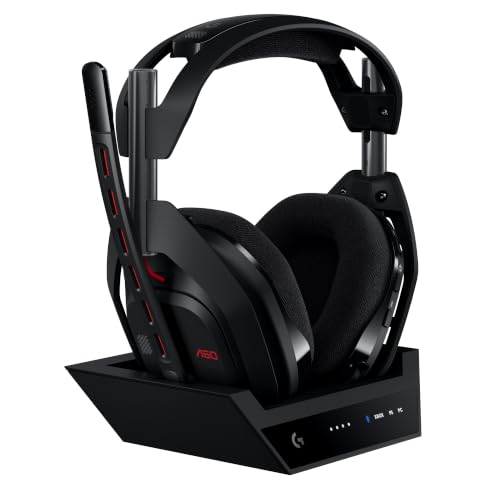
A wireless headset with graphene drivers, a full-bandwidth boom mic and on-ear switching between PC and console, with Bluetooth mixing for a phone.
The A50 comes from the Astro line and is tuned for people who move between platforms. PLAYSYNC lets you tap between PC, PlayStation and Xbox from the earcup, and Bluetooth dual-device mixing brings a phone call or Discord into the game audio. The listing gives 24-bit LIGHTSPEED wireless, a 48 kHz full-bandwidth boom mic and PRO-G graphene drivers with 40mm diameter.
In Tarkov terms, the useful parts are the clear mic for callouts and the drivers Logitech describes as tuned for audio separation and timing accuracy. Treat those as the manufacturer’s claims, not our results. Battery is listed at 24hr, which is shorter than the PRO X3, so this is the pick for convenience across systems rather than endurance. If you want open-back sound or the longest battery, look elsewhere on this page.
Best for: a PC player who also games on a console. Skip it if: you want the longest battery life or noise cancellation.
Best open-back with a mic: ASUS ROG Kithara HIFIMAN

Open-back planar magnetic headphones with an on-cable boom mic, an adjustable headband and a set of extra ear pads, built to work with DACs, amps and PCs.
This is the bridge between the two routes. ROG tuned 100mm HIFIMAN planar magnetic drivers in an open-back design, which the listing describes as a spacious, natural soundstage with clear separation across bass, mids and treble. For Tarkov that wide, open sound is the reason players move away from closed gaming headsets: it gives a roomier sense of where a sound sits around you.
Unlike the studio headphones below, it includes a full-band MEMS boom microphone on the cable, so you can talk to your squad without buying a separate mic. It ships with a 4.4mm balanced plug, 3.5mm and 6.3mm plugs and a USB-C adapter, so it plugs into a DAC or amp. Open-back means sound leaks out and room noise leaks in, so skip it if you share a space or play loud. It is wired, so there is no battery to manage.
Best for: the open-back route without sourcing a separate microphone. Skip it if: you want wireless or you play in a loud room.
Best for open soundstage: Sennheiser HD 490 PRO

Open-back studio headphones with a detachable cable, two sets of washable ear pads and an open-back design, but no microphone.
Sennheiser describes the HD 490 PRO as having an extremely wide, dimensional sound stage and ultra-precise localization, which is the quality that matters most when you are trying to place a footstep above or behind you. The open-frame architecture is aimed at lower distortion, and the listing says it delivers uncolored sound with a frequency response from 5 to 36,000 Hz.
It is a studio tool, so there is no microphone. You will need a separate desktop or clip-on mic for squad comms, and a good amp helps, which is where the FiiO K7 below comes in. Comfort is a strength: the listing lists two sets of ear pads, washable and replaceable, with a detachable cable. Open-back means it leaks sound and lets room noise in, so pick it for a quiet room.
Best for: listening for position with a wide open sound and your own mic. Skip it if: you want a mic built in or you play in a noisy room.
Best for deep, controlled bass: Sennheiser HD 660S2

Open-back audiophile headphones with 42mm transducers, an ultra-light aluminum voice coil and breathable ear cushions, but no microphone.
The HD 660S2 is the music-first option on this list. The listing gives an open-back design with 42mm transducers and an ultra-light aluminum voice coil for detailed highs, rich mids and controlled bass. In a game where explosions and gunfire share the mix with quiet cues, the appeal is a sound that stays clean when the scene gets busy, along with a spacious soundstage for placing sounds.
Sennheiser stresses comfort for long listening sessions, with breathable, plush ear cushions, and the headphones are marketed to gamers as well as audio fans. Like the studio Sennheiser above, it has no mic, so budget for a separate one. It is a wired, open-back design, so room noise will get in and your squad may hear the room if you do not use a good mic. Skip it if a built-in boom mic matters to you.
Best for: open-back listeners who also use the same headphones for music. Skip it if: you want a built-in mic or wireless convenience.
Best amp for headphones: FiiO K7 Desktop DAC and Amplifier
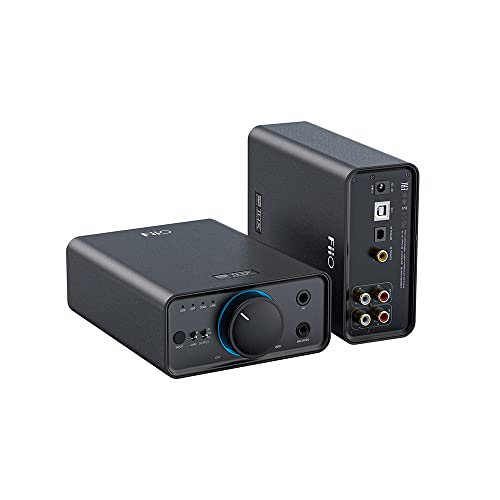
A desktop DAC and amplifier with balanced and single-ended outputs, built to drive full-size open-back headphones from a PC over USB.
This is the part of the headphone route that most gaming guides skip. Open-back headphones like the Sennheisers above often benefit from a proper amp, and the FiiO K7 is a desktop DAC and amp with dual AK4493SEQ DACs and dual THX AAA 788+ amps. The listing says its output power can drive most headphones, including full-size models, and it takes USB, optical, coaxial and AUX inputs.
It offers a 4.4mm balanced output as well as single-ended outputs, plus two gain levels and three output levels, which is useful when you switch between headphones. It does not add a microphone, so you will still need one for squad comms. It also adds another box to your desk and another set of cables to manage. If you buy a wireless gaming headset instead, you do not need this at all.
Best for: driving open-back headphones from the PC with a proper amp. Skip it if: you are buying a wireless gaming headset.
Open-back or closed for Tarkov
The biggest choice is the design. Closed gaming headsets seal your ears from the room, which keeps game audio in and background noise out, and several picks here add active noise cancellation. Open-back headphones let sound pass through the earcups, which gives a wider, more natural sense of space and can make footsteps and doors easier to place. The price of that openness is leakage in both directions, so open-back suits a quiet room and a patient squad, not a shared bedroom.
If you are not sure, start closed. A wireless gaming headset with a good mic is a complete solution, while the open-back route means buying headphones, a mic and, usually, an amp. If you already own studio-grade headphones, the open-back picks and the FiiO K7 are the upgrade path.
Mic quality and squad comms
Tarkov squads live and die on callouts, and a muffled mic is as costly as a muffled headset. Look for a boom mic or a full-bandwidth capsule, and for noise rejection if you play near a fan or a window. The Logitech and SteelSeries headsets here all list a dedicated mic feature, and the ASUS Kithara includes a boom mic on the cable.
The studio-style Sennheiser headphones have no mic at all. That is not a flaw, but it is a cost: plan for a separate desktop or clip-on microphone and check that it picks up your voice without also picking up your keyboard.
Wired or wireless, and comfort for long raids
Wireless removes the cable and, on the headsets listed here, adds multi-device mixing, but you are managing a battery. The Nova Elite solves that with swappable batteries, and the G PRO X3 lists very long battery life. Wired headphones never run out, which is why the open-back picks are a good fit for a fixed desk.
Raids and stash management add up to long sessions, so comfort counts. Look for adjustable headbands, breathable or foam ear pads and, for the open-back route, spare pads. Heavy, tight headsets cause fatigue, and fatigue shows up as slower reactions late in the evening.
Audio and Season 2 modifiers
Season 2 lets you build a character with positive and negative modifiers, and some of them involve sound directly. If you plan to lean on audio, read the modifier guides before you commit to a build, and use our Season 2 modifier calculator to check what a build costs. A good headset helps most when you are listening for an opponent, and it will not undo what a modifier does to your character.
More Tarkov gear and builds
- The full high-end Tarkov gear guide: CPU, GPU, audio, mouse, keyboard and chair picks
- Best monitor for Tarkov: pair your audio with a fast OLED panel
- Bushborne modifier guide: walking in vegetation generates less noise and does not inflict movement slowdown
- Schizo modifier guide: your character occasionally hears phantom sounds, a negative modifier worth knowing before you rely on your ears
- Loose Tongue modifier guide: your character occasionally does a voice line after performing any action
FAQ
What is the best headset for Tarkov?
For most high-end setups, a wireless headset with a clear mic, such as the SteelSeries Arctis Nova Elite, is the easiest complete answer. If you prefer a wider sense of space, open-back headphones like the ASUS ROG Kithara, which includes a boom mic, are the alternative.
Are open-back headphones good for Tarkov?
They can be. The open design gives a wider sense of space, which can make sounds easier to place. They leak sound and let room noise in, so they suit a quiet room. Most need a separate mic, and an amp such as the FiiO K7 can help drive them.
Do I need a DAC or amp for Tarkov?
Not with a wireless gaming headset. For open-back headphones such as the Sennheiser HD 490 PRO or HD 660S2, a desktop DAC and amp can drive them properly and is the usual pairing.
Does virtual surround sound help in Tarkov?
We make no claim either way. If your headset or amp offers surround or EQ features, try your own setup with them on and off and keep whichever lets you place sounds more easily.
Sources
Product details from the Amazon listings as of 27 November 2026. Listings, stock and specs change; check the listing before you buy. Unofficial fan site.


Pingback: Best High-End PC Gear for Tarkov: CPU, GPU, Monitor, Audio